

As AI writing tools evolve, we expect to see them specialize. That's the case with Sudowrite--a fiction-writer's companion for venturing into AI writing support. Sudowrite is built for exactly that: moving from a story idea to an outline, then to scenes, then to readable chapter drafts—fast. In this post, I’ll walk through a hands-on test where I used Sudowrite the way a “normal” novelist would: Story Bible → outline → scenes → chapter prose → rewrites. I’ll show what felt genuinely useful, what got messy, and what I’d do differently if I were starting a book tomorrow.
Most of what we learn about a tool comes first from the company's marketing pages. I really challenged myself to test this for how it feels to a user. I’m reviewing the experience of actually using the tool, including where the UI felt confusing, how the credit system behaves in real usage, and what “Higher quality” output looks like when you pay for it. If you’re searching for a practical Sudowrite review that’s based on real use (not hype), you’re in the right place.
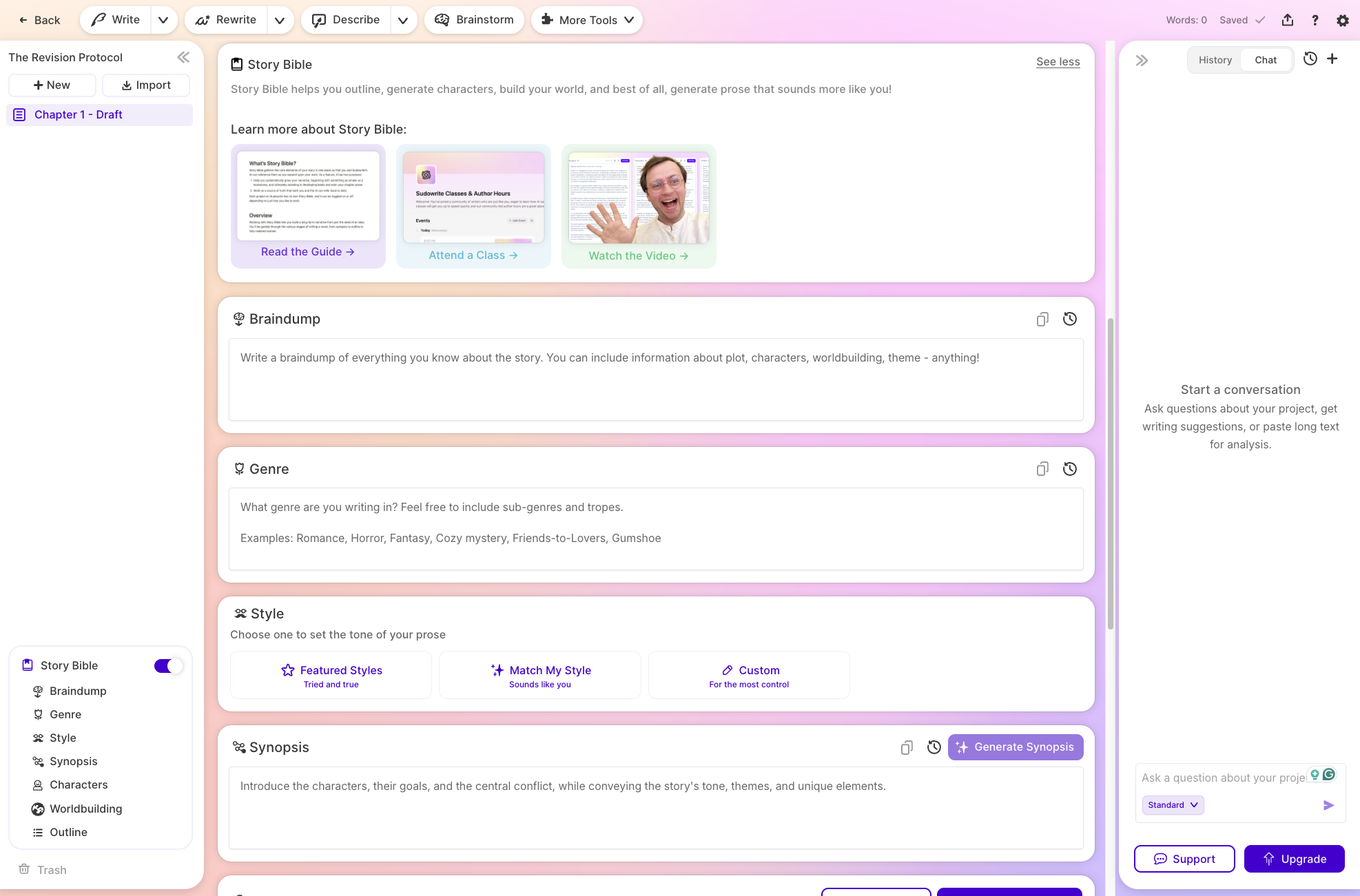
Sudowrite is an AI writing tool focused on creative writing, helping you turn a rough idea into structured drafting. The positioning is simple: it’s not a general-purpose chatbot; it’s a writing tool designed around a novelist’s workflow. In my test, that showed up in how Sudowrite nudges you toward structure first (Story Bible, outline, scenes), then drafting.
The core promise is that Sudowrite can help you write faster while still letting you steer the work. It’s at its best when you treat it like a junior co-writer: you prompt the AI, you review what it produced, you edit, you keep what works, and you redirect what doesn’t. That “director mindset” is the difference between usable pages and mushy, generic prose.
One important framing: Sudowrite is one of the few tools that tries to keep your book’s internal logic in view (characters, setting, continuity) instead of behaving like a blank chat window every time you ask for a new chapter. If you’re trying to write a novel, that matters.
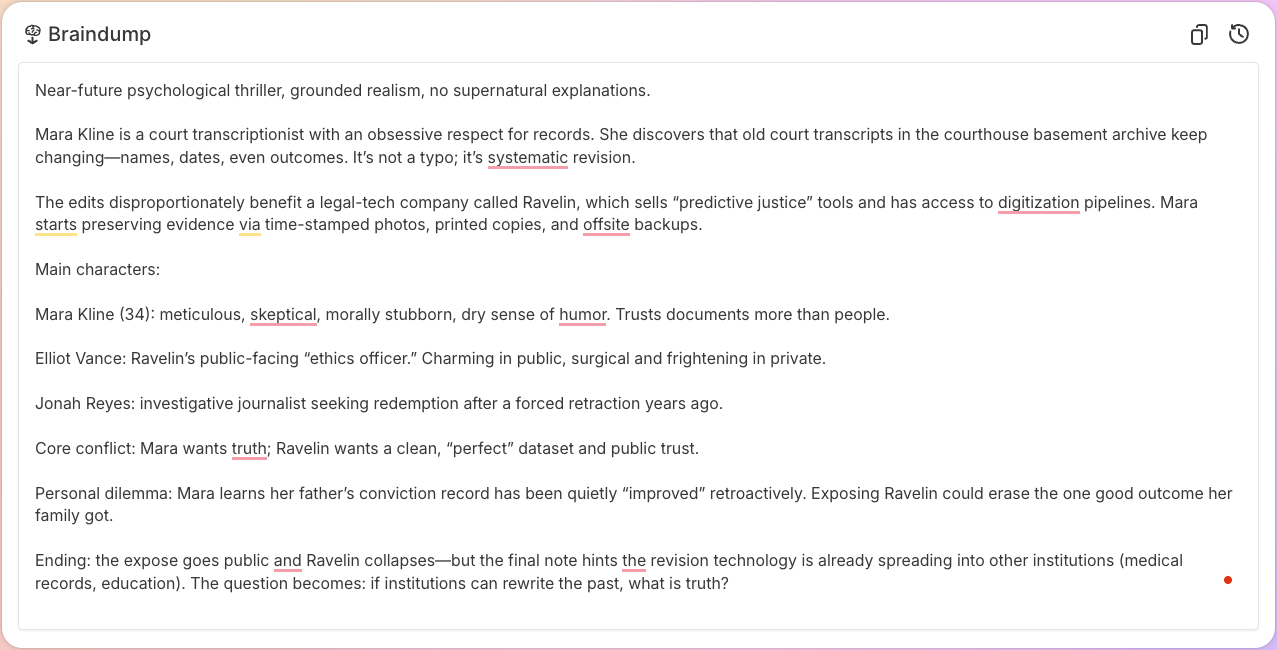
To put Sudowrite to the test, I simulated how a normal user would use Sudowrite: start a new project, build a Story Bible, generate an outline, break it into scenes, and then generate chapter prose. The goal wasn’t to produce a publish-ready chapter. The goal was to see if Sudowrite provides a reliable path from “blank page” to a credible first draft.
This matters because many AI writing tools like chatbots tend to demo a single paragraph. That’s easy. The hard part is maintaining consistency across a multi-chapter writing process—keeping characters and tone stable and avoiding your story idea from drifting into generic tropes.
In this test, I wrote Chapter 1 using the default flow (scenes to prose), then used the chat to request targeted edits (tightening scenes, keeping third-person limited, keeping past tense, preserving motifs like the “one millimeter misalignment,” and preventing an early twist from being revealed too soon). I then repeated the process for Chapter 2, comparing a standard output with a “Higher quality” output that consumed more credits.

The Story Bible is the heart of Sudowrite. Conceptually, it’s where you define your project’s “facts” so the AI doesn’t wander: characters, tone, setting, important backstory, and key constraints. It’s also where most writers will naturally brainstorm.
In practice, the Story Bible works best if you treat it like a living document. You start with rough notes, then refine them as you discover what your story actually is. That’s a normal fiction pattern: you don’t know the whole book on day one, but you gradually lock in what matters—character motivations, stakes, rules of the world, and major plot points.
The big benefit is continuity. Sudowrite’s AI is designed to reference your Story Bible while it generates new material, so your protagonist doesn’t randomly change careers between scenes. The big risk is that if your Story Bible is vague, the AI will fill in blanks, and you might accept those details without noticing they change your intent. The fix is simple: customize what gets generated, and keep the Story Bible updated as your decisions become canon.
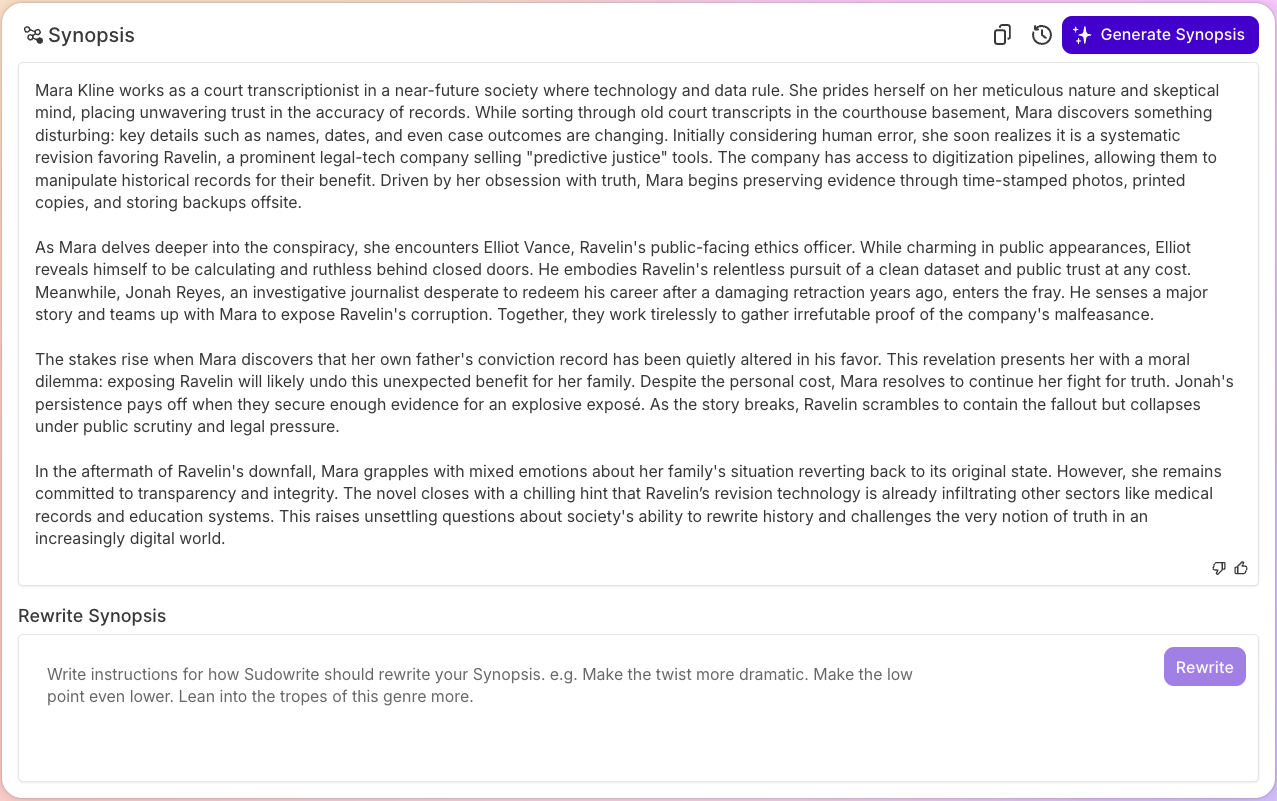
Once the Story Bible has enough substance, Sudowrite can generate an outline: a chapter-by-chapter plan that becomes the launchpad for drafting. This is where the tool starts to feel like it was designed for long-form fiction rather than just one-off prompts.
Worldbuilding matters here, too. In many tools, worldbuilding becomes a vibe—adjectives, mood boards, and a loose “aesthetic.” In Sudowrite, worldbuilding is more structured. It encourages you to define elements that keep a novel consistent: locations, institutions, rules, recurring objects, and relationships. That structure is an area where Sudowrite tends to outperform a blank chat window.
In my experience, Sudowrite can generate a coherent outline quickly, but coherence isn’t the same as originality. You’ll still want to rewrite or edit the outline to avoid generic beats. One good technique is to revise your synopsis after you see the first outline, then regenerate or rephrase it with tighter constraints. That loop is how you get from “serviceable” to “distinct.”
Marketers who are polishing their writing skills take the same outline-first approach to SEO content too.
Sudowrite’s scene-based workflow is one of its strongest features. Instead of asking an AI to write an entire chapter in one shot, you break the chapter into scenes, then generate prose scene by scene. That’s how a lot of real writers work—even without an AI assistant—because scenes are the atomic units of story.
This is where Guided Write becomes genuinely useful. You’re not just asking for “write Chapter 2.” You’re guiding the AI through a scaffold: setting, objective, obstacle, turning point, and last line. When it works, it feels like having an assistant who can quickly generate connective tissue: transitions, sensory grounding, pacing, and the kind of detail that makes a scene feel lived-in.
In our test, Chapter 1’s generated prose nailed the atmosphere (sterile, procedural, controlled) and gave the protagonist a believable precision. But it also sometimes leaned into hyper-specific quirks that made her feel slightly unreal. That’s a common pattern with AI-generated prose: it tries to impress with specificity. You do want specificity, but you also want believability and restraint—especially if your writing style is meant to feel grounded and procedural.

This is the real test for any AI model: not whether it can output words, but whether it can rewrite in a way that preserves intent.
I asked for an edit pass on Chapter 1 scenes with constraints like: keep third-person limited, keep past tense, preserve the motif, reduce unnecessary proper nouns, remove a premature twist reveal, tighten pacing, and end with a hook that suggests something is off without proving it. The goal was not “more dramatic.” The goal was “more controlled.”
Sudowrite’s chat didn’t directly edit the manuscript in place, but it did return a revised version that could be copied and pasted back into the project. That’s important: you can use the chat as a revision generator even if it’s not an inline editor. You paste the content, you request a rephrase or rewrite, and you paste the improved version back into your draft.
When this worked well, it removed cliché suspense language and replaced it with observable detail and procedure. That’s the kind of cleanup you also want in marketing drafts when you use AI: remove the obvious “AI voice,” then add human specificity and real perspective.
Let’s talk user experience, because Sudowrite is not always intuitive at first.
Sudowrite has a chat interface that looks like it should edit your manuscript, but it behaves more like a mentor/guide: you ask questions, you paste text for analysis, and you receive suggestions or rewritten text that you manually copy into your draft. That’s not inherently bad, but it does create friction for users expecting “chat edits the doc.”
The Extra Instructions area can also be confusing. It looks global, but in practice, it can feel scoped to a specific step in the workflow. If you want global constraints (POV, tense, voice) across an entire chapter, you need to learn where those instructions belong—scene setup, guided writing, or chat rewrite prompts.
Once you get your mental model right, it’s workable. But if you’re coming from ChatGPT, it’s a shift. The upside is that the interface encourages structure. If you’re the kind of writer who gets stuck, the nudge to define the scene objective can be the difference between staring at the page and actually writing.
One of the most practical discoveries in testing Sudowrite was that output quality depends heavily on the generation mode. There’s a default mode that’s fast, and higher-quality options consume more credits. When I used the “Higher quality” model in chat for Chapter 2, the prose became noticeably more grounded.
In practice, that looked like this:
That matters if your story is procedural. The tension isn’t supernatural; it’s systemic. So the higher-quality mode produced a better “fit” for the tone—less “movie trailer,” more “real-world drift.”
How does Sudowrite vs other tools shake out?
Sudowrite stands out because it’s built around the writing workflow itself: Story Bible, outline, scenes, drafting loops, and rewrites. That’s the feature that Sudowrite offers that feels purpose-built for fiction authors.
Pricing is where Sudowrite becomes very real, very fast.
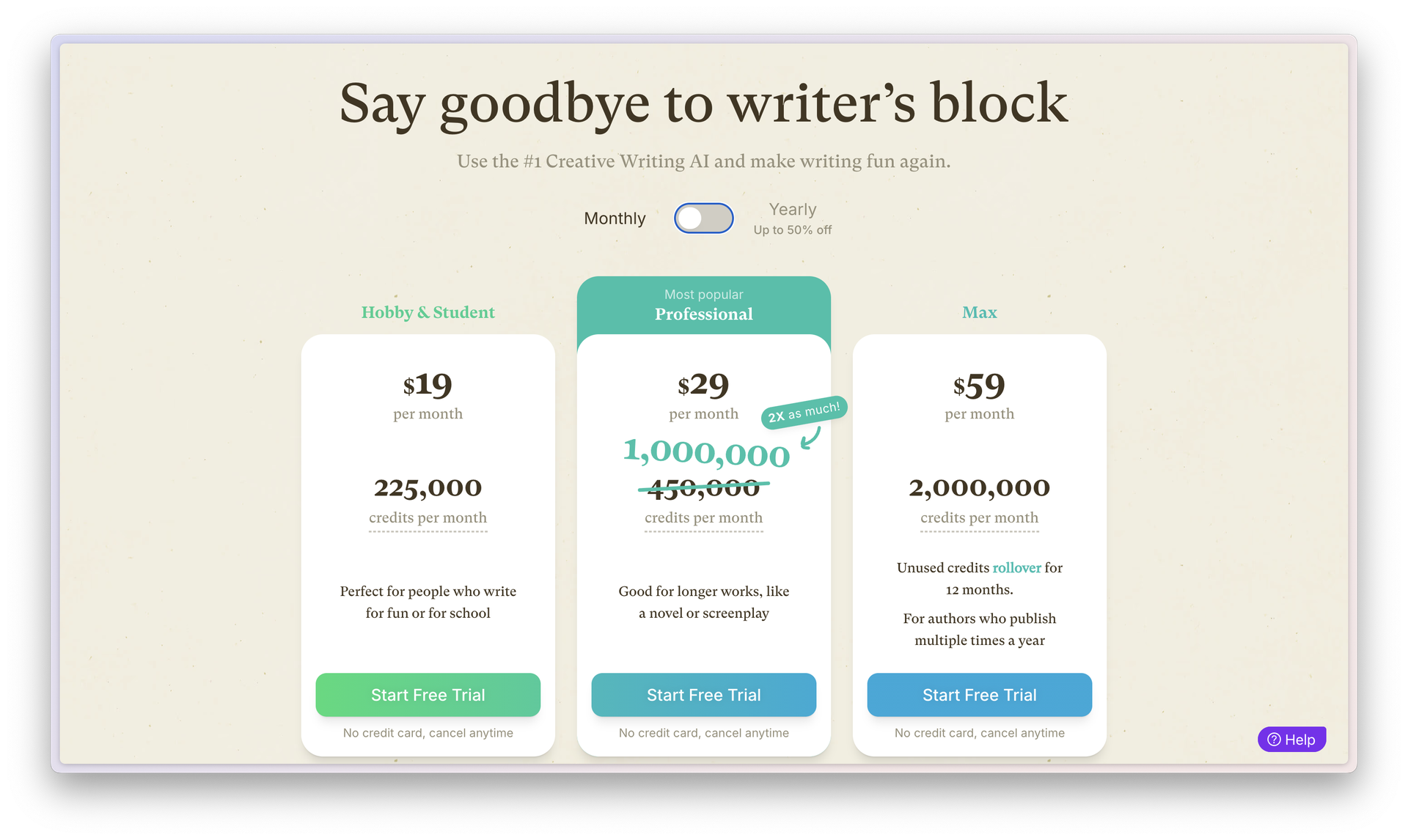
Pricing as of January 2026 (based on Sudowrite’s pricing page at the time of testing): there are three main plans, each with a monthly credit allotment. On monthly billing, Hobby & Student is $19/month for 225,000 credits, Professional is $29/month for 1,000,000 credits, and Max is $59/month for 2,000,000 credits (with unused credits rolling over for up to 12 months on Max).
If you switch to yearly billing (shown as a lower per-month equivalent), the pricing drops to $10/month for Hobby & Student (225,000 credits), $22/month for Professional (1,000,000 credits), and $44/month for Max (2,000,000 credits). The checkout highlights Start Free Trial, notes that no credit card is required, and lets you cancel anytime.
The practical takeaway: Sudowrite’s pricing is based on a number of credits. If you draft heavily (chapters, rewrites, higher-quality generations), you’ll feel the difference between plans quickly—especially once you move beyond light brainstorm sessions into full scene and chapter production.
I started with the free trial, which included 10,000 credits. It was enough to test the workflow, but it ran out quickly once I moved from planning into actual writing. To continue, I subscribed to the professional plan for a month, which made heavier drafting and rewrite loops much more realistic.
Here’s the biggest downside I noticed: unused credits on the Hobby & Student and Professional plans expire at the end of the billing cycle. If you don’t use them, you lose them. The Max plan offers rollover for up to 12 months, and purchased credits don’t expire.
If your rhythm is binge-drafting, then pausing, that expiration can be frustrating. If your rhythm is consistent drafting, it may be fine—possibly even the best value.
Sudowrite vs a general chatbot is mostly a workflow argument.
If you want a writing tool that guides you from story idea to outline to scenes to prose—and you like structured drafting—Sudowrite is genuinely compelling. The Story Bible and scene-based drafting reduce drift and make long projects feel manageable. If you freeze at the blank page, Sudowrite could help you write by generating enough starter clay to keep you moving.
If you prefer a minimalist setup, Sudowrite may feel like too much interface. And if you dislike credit systems, the credit-based pricing model might be your biggest blocker.
Who should use Sudowrite:
Who might skip Sudowrite:
Verdict: Sudowrite could be the best AI writing tool for a specific kind of writer—the one who wants a structured drafting loop and is willing to guide the AI. Sudowrite isn’t magic, and it won’t replace actual writing. But as an ai writing tool for drafting fiction, it’s one of the few products that feels purpose-built rather than retrofitted.
If you want to write a novel faster, and you’re okay with treating the output as clay (not canon), Sudowrite stands out. If you want maximum flexibility with fewer constraints, you may prefer ChatGPT or Claude paired with your own writing system (or Novelcrafter).


